Rebranding Rollout Plan: The T-90 Countdown and Comms Tiers
A rebranding rollout plan written from inside the company: the T-90 countdown, a systems inventory with an owner per line, and a tiered customer comms matrix.
The first invoice you send under the new name comes back with one line from a controller at your third-largest account: “do we have a contract with these people?” The name on the invoice does not match the name on the signed MSA, and accounts payable has stopped the payment until someone reconciles the two. The account executive who owns that relationship first heard about the rename at an all-hands nine days ago. The support macro that would have answered the question still says the old name, because nobody owned the support macros.
That morning is what a rebranding rollout plan is supposed to prevent, and it is the part almost nobody writes down. Search for a brand rollout plan and most of page one comes from brand studios and slide-template vendors: why you are rebranding, how to align internally, phased versus big bang, the announcement moment, sentiment afterwards. All of it stops at the announcement.
A rebranding rollout plan is an operations document, not a brand document. That is the claim this post defends. The identity work is the easy half. The hard half is the couple of hundred places your company name is currently stored, each with a different system owner, a different change window and a different way of failing. An agency structurally cannot write that half, because they do not have your CRM, your billing stack or your contract paper.
I write this from the product marketing seat, which is where a rebrand lands after the studio invoices and leaves.
To roll out a rebrand, work backwards from launch day in five phases and give every system one named owner:
- T-90 to T-61, lock it. Trademark filed, domain and handles secured, systems inventory built with one owner per line.
- T-60 to T-31, rebuild it. Decks, one-pagers, battlecards and help docs rewritten. The 301 map drafted URL by URL.
- T-30 to T-8, stage it. Tier 1 accounts pre-briefed by a named human. Contract, invoice and macro templates staged, not published.
- T-7 to T-1, tell them. Tier 2 emails sent by their actual owner, in-app banner scheduled, change freeze on billing and DNS.
- Day 0 to T+30, flip and sweep. Redirects live, directories and review profiles updated, weekly hunt for every surviving instance of the old name.
What a rebranding rollout plan covers that the agency deck does not
A brand studio ships identity. A rollout ships change management across every system that stores a string. The two are not the same project and they rarely have the same owner.
| The studio hands over | Nobody owns until launch week |
|---|---|
| Logo files, color, type, brand book | Email signatures across 400 employees |
| Naming rationale and messaging house | Contract paper, order forms, DPAs |
| Website design and launch page | Invoice and billing templates |
| Announcement copy and press kit | Support macros and help center articles |
| Social banners and templates | App store listings and partner directories |
| A sentiment survey at T+90 | The 301 map and the review-site records |
If the name change also moves your market position, that is a separate decision, settled long before this plan starts. I have written up the difference in branding vs positioning. This post assumes the strategy is signed off and the date is already in the calendar.
The rebranding process below is deliberately boring. Boring is the point: on launch day you want zero decisions left to make.
The phased countdown: a rebranding rollout plan from T-90 to T+30
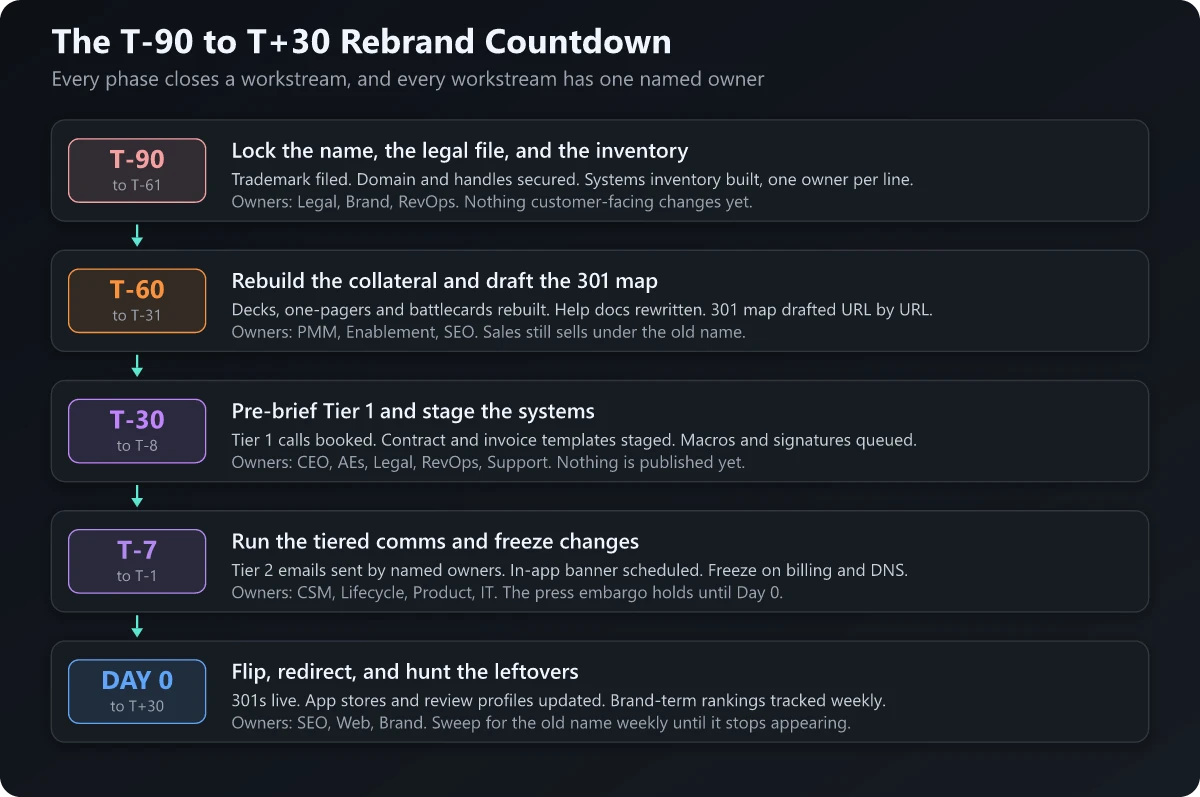
Ninety days is the shortest window I would take for a company-level rename with enterprise contracts in play. A product-level rename can compress to 45. Below 30 days you are choosing which workstream to fail at, so choose deliberately.
Seven workstreams run in parallel across the countdown. Each gets a hard deadline and one person’s name against it.
| Workstream | Hard deadline | Owner | ”Done” means |
|---|---|---|---|
| Customer comms | Tier 1 by T-14, Tier 2 by T-7, Tier 3 by T-2 | PMM, with AEs and CSMs | Every Tier 1 account has a logged call, not a logged email |
| Sales collateral | T-30 | Product marketing | Old-name assets deleted from the library, not just superseded |
| In-product strings | Staged T-1, flipped T-0 | Product with engineering | Login, empty states, transactional email and PDF exports all read new |
| Third-party directories | Submitted T-7, live by T+7 | Partner marketing | App stores, integration listings and partner pages updated |
| Review profiles | Requested T-14, live by T+3 | Customer marketing | Review carry-over confirmed in writing with each site before the rename |
| Email and DNS | Warming from T-45 | RevOps with IT | SPF, DKIM and DMARC pass on the new domain before volume moves |
| SEO redirects | Map signed off T-14, live T-0 | SEO owner | Every indexed URL mapped one to one, Change of Address filed |
The column that does the work is the last one. “Update the collateral” is not a deadline. “No asset in the shared library returns a hit for the old name” is.
The systems inventory: one line per surface, with an owner
This is the artifact that separates a real rebranding checklist from a printable PDF. Enumerate every surface your company name is stored in, name the failure mode, assign one owner, and set the phase it closes in.
| Surface | What actually breaks | Owner | Due |
|---|---|---|---|
| CRM templates and sequences | Live sequences keep sending the old name for weeks | RevOps | T-14 |
| Marketing automation footers | The compliance footer names an entity that no longer exists | Lifecycle | T-7 |
| Billing and invoice templates | AP rejects an invoice from an unrecognized payee | Finance | T-30 |
| Contract paper: MSA, order form, DPA, SOW | Counsel asks: name change, or assignment? | Legal | T-45 |
| Email signatures | Half the company signs off with the old name for months | IT | T-0 |
| SSO tile and login screen | The identity-provider tile still shows the old logo | IT with product | T-0 |
| Transactional email sender and reply-to | Receipts and password resets arrive from a stranger | Product | T-1 |
| App Store and Google Play listings | Character limits force a shorter name than you approved | Mobile | T-7 |
| Integration and partner directories | A partner listing outranks you for the old name | Partner marketing | T-7 |
| Review-site profiles | Years of reviews sit on an orphaned product record | Customer marketing | T-14 |
| LinkedIn Page, Crunchbase, Google Business Profile | A name edit triggers re-verification | Brand | T-7 |
| Support macros and help center | Support answers in the old name after launch | Support | T-1 |
| API docs, SDK names, error strings | The developer surface keeps the old name for years | Engineering | T+30 |
| DNS, sending domain, SPF, DKIM, DMARC | Deliverability collapses on a cold domain | RevOps with IT | T-45 |
| 301 redirect map | Traffic and links stop at the old URLs | SEO | T-0 |
| Status page, trust center, security portal | Enterprise procurement checks these first | Security | T-7 |
| Careers page and ATS | Candidates apply to a company that no longer exists | Talent | T-7 |
Four of those lines carry hard external constraints worth knowing before you approve a name.
App store names are capped. App Store Connect requires an app name of “at least two characters and no more than 30 characters”, subtitle capped at 30 as well (Apple). Google Play is equally hard-capped: “Your app title must be 30 characters or less”, a short description has to land “in 80 characters or less”, and “A full description allows for 4,000 characters” (Play Console Help, store listing best practices). A long descriptor after the new name survives neither store.
Review sites have a rebrand convention. G2 tells sellers to use the official name from the website or legal documentation, avoid promotional language and trademark symbols, and adds: “If you are rebranding, you can include the former name in parentheses for clarity (e.g., New Brand (formerly Old Brand))” (G2 documentation). That parenthetical keeps the old name searchable on the profile. What the page does not cover is review history: it addresses the format of the name only, and says nothing about what happens to existing reviews on a rename. Get review carry-over confirmed in writing by each site before the record changes.
A Google Business Profile edit can cost you verification. Google warns that “if you change your business name after it’s verified, you might need to verify your business again” (Google Business Profile Help). Schedule that at T-7, not on launch morning. Re-verification is only half the damage, since the rename also breaks NAP consistency across every data aggregator and directory still carrying the old name, so run the profile edit alongside the citation cleanup sequence in the 20-step map pack checklist.
Changing your primary domain does not change anyone’s email. Google Workspace is explicit that “adding a new domain won’t affect or change your current email”; the domain change itself “can take up to 48 hours”, and every user’s primary address then has to be switched over as a separate step, though Google documents a spreadsheet path to rename addresses in bulk rather than one at a time (Google Workspace admin help). Four hundred mailboxes needs its own project plan.
The developer-surface line is the one I would put on a wall. Salesforce renamed Pardot to Marketing Cloud Account Engagement years ago, yet the Metadata API type is still called PardotSettings, described in the docs as representing “Marketing Cloud Account Engagement settings in your Salesforce org” (Salesforce Developers), and the current API documentation still sits under a path carrying the old name (Account Engagement API). A rename reaches marketing in a week and the system layer in years. Write down which instances you are consciously choosing not to fix.
Your brand guidelines document should end with this inventory attached, because guidelines without a surface list are a style guide nobody can execute against.
The tiered comms matrix: audience, sender and days before public
Every page-one rebrand communication plan treats customers as one audience to be emailed on launch day. That is the biggest miss in the category. A customer with a seven-figure contract and a customer on a free tier need different senders, different channels and different lead times.
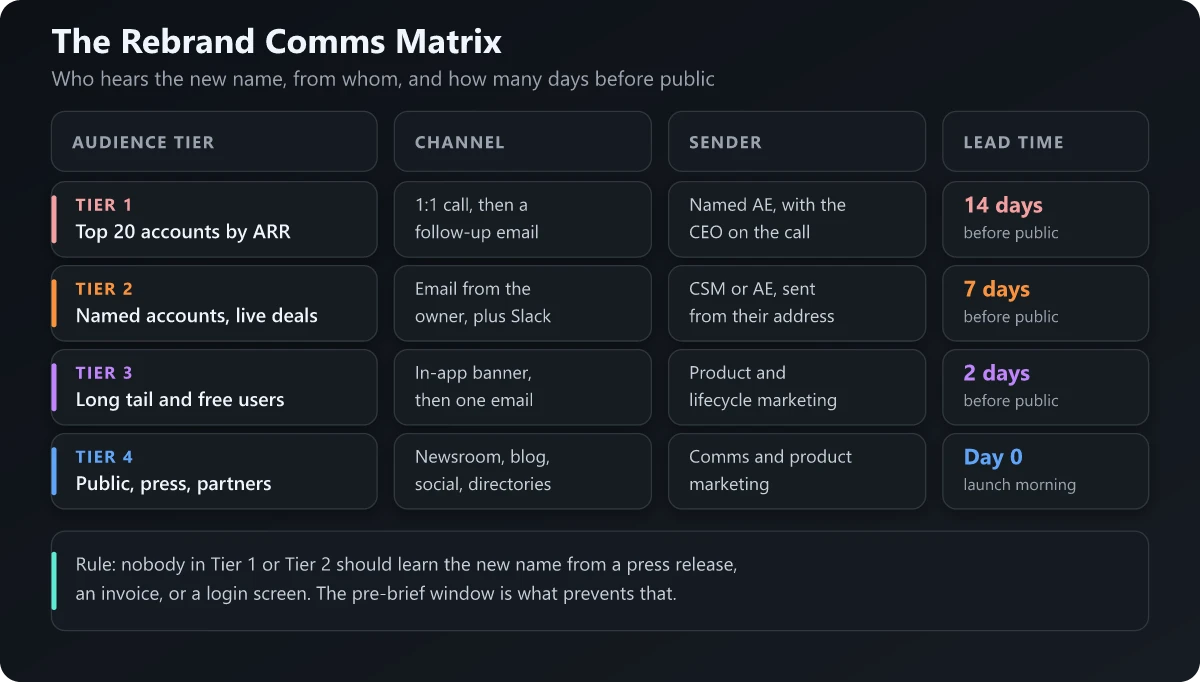
| Tier | Who | Channel | Sender | Days before public | In writing |
|---|---|---|---|---|---|
| 1 | Top 20 accounts by ARR, plus anyone in a renewal window | Scheduled 1:1 call, then a written follow-up | Named AE, with the CEO or founder on the call | 14 | One-page brief: legal entity, billing, contract |
| 2 | Named accounts, live deals, open security reviews | Email from the person they know, plus a shared-channel note | Their CSM or AE, from their own address | 7 | Same brief, plus invoice and PO guidance |
| 3 | Long tail, self-serve, free users | In-app banner first, then one lifecycle email | Product and lifecycle marketing | 2 | FAQ page and a “formerly known as” note |
| 4 | Press, prospects, partners, the public | Newsroom, blog, social, directories | Comms and product marketing | 0 | Press release and launch page |
Two rules make the matrix work. First, the sender is a person, not a brand: a rebrand email from “the team at NewName” to an account that has never heard of NewName is indistinguishable from phishing. Second, the pre-brief window is an embargo, and every Tier 1 and Tier 2 note says so in plain language.
Tier 1 gets a call rather than an email because the questions are commercial. Does the contract need re-papering. Does the entity on the invoice change. Does the completed security review need redoing. Does the vendor master record need updating before the next payment run. Those get answered live, by someone with authority, or they sit in procurement as an open ticket for a quarter.
The tiering discipline is the same one I use for any commercially sensitive announcement. If you have run a price increase announcement, you already have the account tiers and the owner map. Reuse them rather than rebuilding them.
Rebrand internal communication: internal first, and in what order
Rebrand internal communication fails in one of two directions. Either it leaks three weeks early, or the revenue team learns the new name from a customer. Both come from the same mistake, which is telling everyone at once.
| When | Who | Format | What they must be able to do next |
|---|---|---|---|
| T-45 | Exec staff and board | Working session | Approve the name, the date and the budget |
| T-21 | People managers | 30-minute briefing plus an FAQ doc | Answer “does my job title change” without escalating |
| T-14 | Revenue org: sales, CS, support, partners | Live enablement and a certification | Say the new name and the reason in one sentence, on a live call |
| T-7 | All hands | Full reveal, with the asset drop dated | Keep it internal for seven more days |
| T-1 | Everyone | Signatures, decks, chat and video backgrounds pushed | Change every surface at 09:00 on Day 0 |
The revenue org is briefed before the all-hands on purpose. They are the group most likely to be asked a hard question first, and the group most likely to be mid-conversation with an account when the news breaks.
Give every employee one sentence that explains the change and can be said out loud without notes. Building it is the same work as any other brand messaging framework exercise: one claim, one reason to believe, no adjectives. When the reason is a problem customers can already see, name it: Burger King’s 2026 mascot retirement launched with an Oscars ad admitting that “fast food just fell off” before saying what the brand was doing to get back on track.
B2B rebranding: reps mid-deal, the asset library and paper signed under the old name
This is the layer that makes B2B rebranding different from the consumer version, and it is absent from every rebranding playbook I found on page one.
The rep with a live deal
| The situation | What loses the deal | What holds it |
|---|---|---|
| A proposal is already out under the old name | A corrected version with no explanation | A pre-approved two-line note from the AE, with the amended proposal |
| A security review is in flight | Restarting the review under a new entity | Written confirmation that the entity and certifications are unchanged |
| Procurement holds the old name in their vendor master | Letting finance find out at invoice time | A vendor-record pack: legal name, tax form, remittance details |
| The champion circulated a deck internally last week | Silence | A one-slide “we are now called X” insert they can forward themselves |
| The contract renews inside the launch window | Re-papering under time pressure | A pre-agreed position: side letter, no commercial terms reopened |
Legal has to answer one question before any of this: is the change a corporate name change or an assignment. A name change usually needs notice and a side letter. An assignment can trigger consent rights in the MSA. Get that answer at T-45, in writing, and put it in the Tier 1 brief.
If the name is not yet registered, that timeline sits outside the countdown. USPTO examination “may take a number of months”, and after publication “it can take three to four months” before the next official status (USPTO). Start it a year out. If the new name is not locked yet, settle it with the naming gates before the countdown starts, because a trademark conflict discovered at T-30 is not a slip you can absorb.
The collateral inventory nobody scopes until it is too late
Someone always scopes “the website and the deck” and then discovers the rest in launch week. The full list, roughly in the order it gets forgotten:
- Pitch deck, and the six segment variants living on reps’ desktops
- One-pagers, solution briefs, the ROI calculator spreadsheet
- Battlecards, including every competitor page that names you
- Case studies and customer logos with the old lockup baked into the image
- Help center articles and every screenshot inside them
- API reference examples, sample payloads, error message strings
- In-product empty states, tooltips, onboarding checklists
- Email templates: transactional, lifecycle, sequences, out-of-office
- Proposal, SOW and order form templates
- Webinar decks, event booth graphics, video intros and outros
- Paid ad creative, social banners, chat app icons, calendar invite blurbs
Screenshots inside help docs are the most underestimated line: individually cheap, collectively enormous, and the artifact customers keep seeing the longest. Scope them at T-60 or accept them as a T+90 project.
On the sales side, rebuild first what reps actually open in a live call: the competitive battlecard set, and whatever sits on your sales enablement checklist as the standard first-meeting kit.
Rebrand SEO migration: the 301 map, brand-term cannibalization and review profiles
The rebrand SEO migration is a direct revenue risk and it is missing from every brand studio playbook I have read. Three things matter.
The redirect map. If the rebrand moves you to a new domain or subdomain, submit a Change of Address in Search Console. Google notes “you only need this tool when moving from one domain or subdomain to another”. Map every indexed URL one to one rather than pointing everything at the homepage, and keep the redirects “for as long as possible, generally at least 1 year”. Google sets the timing expectation too: “a small to medium-sized website can take a few weeks for most pages to move, and larger sites take longer” (Google Search Central). Build the map at T-60, sign it off at T-14, and crawl-and-diff it the way you would in a technical SEO site audit. Check the status code that comes back on the diff rather than the one in your ticket, because a permanent redirect your host emits is often a 308, not the 301 you wrote down: two lines of vercel.json on this site return 308 on every permanent redirect, and nothing in the config asks you to choose.
Brand-term cannibalization. People will search the old name for at least a year. Keep one indexable page titled with both names, do not redirect the old brand page into the homepage, and apply the “(formerly Old Brand)” convention across directories so the old name resolves to you rather than to a competitor bidding on it.
Email authentication on the new domain. This is the failure mode that arrives without an error message: mail from an unauthenticated new domain gets filtered, and nobody on your side sees a bounce to investigate. Google’s sender guidelines cover mail sent “to personal Gmail accounts”, which the page defines as “an account that ends in @gmail.com or @googlemail.com”, and set a second tier under the heading “Requirements for sending 5,000 or more messages per day”: SPF and DKIM plus DMARC on the sending domain, From-header alignment with the SPF or DKIM domain, and one-click unsubscribe on marketing mail. The monitoring guidance on the same page is tighter than the requirement bar, so hold yourself to it: keep “spam rates reported in Postmaster Tools below 0.10% and avoid ever reaching a spam rate of 0.30% or higher” (Gmail sender guidelines). Microsoft set equivalent authentication requirements for “domains sending over 5,000 emails per day” to Outlook.com, described as “our consumer service, which is supporting hotmail.com live.com and outlook.com consumer domain addresses”. Enforcement there is staged rather than instant: after 5 May 2025 Outlook would “begin routing messages from high volume non-compliant domains to the Junk folder”, and non-compliant messages “may eventually be rejected” as “550; 5.7.515 Access denied, sending domain [SendingDomain] does not meet the required authentication level” (Microsoft Defender for Office 365 blog). Warm the new domain from T-45.
Treat the domain itself as a system with an owner. Brevo, which renamed from Sendinblue, published an incident report explaining that its brevo.com domain expired on 11 September 2023 and was unreachable for “5 hours and 53 minutes”, taking down its websites, public API and SMTP relay. The stated causes are pure rebrand mechanics: the rebrand forced them onto the previous domain owner’s registrar rather than their usual one, the mailbox receiving expiry notices from that registrar had been disabled over the summer, the payment method on file had expired, and the new registrar sat outside their monitoring pipeline (Brevo Engineering). Every acquired domain inherits somebody else’s registrar account. Put renewal, billing contact and monitoring on the T-90 list.
The rebrand launch plan for Day 0
A rebrand is the one launch day that genuinely does run on a clock. Every surface flips at once and nothing downstream is waiting on somebody’s yes, so Day 0 reads as a run of show with times and owners, rather than as the gated sequence a product launch needs.
| Time | What happens | Owner |
|---|---|---|
| 06:00 | DNS and 301s live in a maintenance window; smoke-test login, checkout, transactional email | IT |
| 08:00 | Internal post: assets, signatures, talk track, escalation channel | Comms |
| 08:30 | Support macros swapped, help center banner live | Support |
| 09:00 | Press release, newsroom post, homepage flip | Comms |
| 09:05 | Tier 3 in-app banner and lifecycle email fire | Lifecycle |
| 09:15 | Social handles, LinkedIn Page, directory submissions | Brand |
| 10:00 | AE outbound to any Tier 2 account that has not acknowledged | Sales |
| 12:00 | First sweep: search the old name across every owned property | PMM |
| 17:00 | Debrief: what broke, who is fixing it, by when | PMM |
Swap the company boilerplate at the end of the press release in the same 09:00 slot, since every later release repeats it; if the rename follows an acquisition, put the parent in the About heading and the first clause, and keep the acquired brand’s own category line after it.
Before you build that run of show, be certain which name is actually changing. Three recent renames define the options. Square changed its corporate name to Block, “expected to be legally changed to ‘Block, Inc.’ on or about December 10, 2021”, while “Square, Cash App, TIDAL, and TBD54566975 will continue to maintain their respective brands” and the NYSE ticker “SQ” was left unchanged (Block). Zoom took the narrower route, dropping one word from the legal entity to become Zoom Communications on 25 November 2024, on the argument that the company “is now about so much more than video meetings” (Zoom). Sendinblue took the widest route: a full product rename onto a new domain.
A parent-only rename is a fraction of the work, because the product surfaces, app listings, in-product strings and support macros never change. If that option is open to you, take it.
What to measure from T+1 to T+90
Sentiment surveys are not a rollout metric. These are.
| Metric | Where it lives | Target |
|---|---|---|
| Old-name occurrences across owned surfaces | Weekly site crawl plus a search of the asset library | Zero by T+30 |
| Branded impressions, old name versus new | Search Console | New name overtakes old by T+90 |
| 404s on mapped old URLs | Search Console page indexing report | Under 1% of the mapped set |
| Spam rate on the new sending domain | Google Postmaster Tools | Below 0.10% |
| Support tickets mentioning the old name | Help desk tag | Declining week on week |
| Deals slipped with “rebrand” as the reason | CRM close-lost or slip reason | Zero |
| Reviews attached to the renamed product record | G2 and Capterra profiles | All of them carried over |
The weekly sweep is the discipline that separates a finished rebrand from an abandoned one. Someone owns it, it happens every Monday, and it runs until two consecutive sweeps come back empty.
Running a rebranding rollout plan that survives launch day
The claim I opened with is the one worth keeping: this is an operations document, not a brand document. The logo is the deliverable everybody looks at and the least likely thing to break. What breaks is the invoice template, the support macro, the SSO tile, the registrar account nobody was monitoring, and the account executive who found out nine days ago.
Three artifacts carry the whole thing: a dated countdown, a systems inventory with one owner per line, and a comms matrix that says who hears the new name, from whom, and how many days before the public does. Build those three and the announcement becomes the least eventful hour of the quarter.
If you fix one thing in your current rebranding rollout plan, make it the inventory. A checklist without owners is a wish list, and a rebrand is decided entirely by the lines nobody claimed.
Frequently Asked Questions
How do you roll out a rebrand?
Work backwards from launch day in five phases: lock the name and build a systems inventory by T-90, rebuild collateral and draft the 301 map by T-60, pre-brief your top accounts and stage the systems by T-30, run tiered comms and freeze changes by T-7, then flip, redirect and sweep for leftovers from Day 0 to T+30. Every line of the inventory needs one named owner and one deadline.
What is an example of a B2B rebrand?
Square renamed its parent company to Block in December 2021 while keeping the Square, Cash App and TIDAL product brands intact. Sendinblue renamed to Brevo, a full product rename onto a domain bought from a previous owner. Salesforce renamed Pardot to Marketing Cloud Account Engagement, and the developer surface still carries the old name years later.
What is the 3 7 27 rule of branding?
It is an agency rule of thumb claiming a person needs 3 exposures to recognize a brand, 7 to associate it with a category and 27 to prefer it. I have never found a primary study behind those numbers, so treat it as folklore rather than data. Repetition genuinely matters in a rebrand, but plan it against your own reach numbers, not a borrowed ratio.
What is the rule of 7 in B2B?
The rule of 7 claims a buyer needs seven touches before they act. There is no traceable primary research behind the figure, and B2B buying committees make it structurally unlikely to be a single number. In a rebranding rollout, replace it with something measurable: how many named contacts in each account have seen the new name, in which channel, and from whom.
What does B2B branding mean?
B2B branding is the work of making a company recognizable and credible to buying committees rather than to individual consumers. In practice it lives in the surfaces procurement, security and finance touch: contract paper, invoices, the trust center, review-site profiles and partner directories, not just the logo and the website.