Claude Code Agent Teams: The Setting, Token Cost and Limits
Claude Code agent teams turn on with one env setting and use about 7x a standard session's tokens when teammates plan. Setup, limits and when subagents are enough.
Claude Code agent teams are switched on by one setting, an environment variable under env in settings.json:
{
  "env": {
    "CLAUDE_CODE_EXPERIMENTAL_AGENT_TEAMS": "1"
  }
}
Read the cost before the use cases. Anthropic’s costs page says “Agent teams use approximately 7x more tokens than standard sessions when teammates run in plan mode”, and the agent teams page opens with a warning that the feature is “experimental and disabled by default”.
I build and maintain this site with Claude Code, and after reading Anthropic’s pages on the feature my position is that agent teams belong at the end of the queue: try a single session or subagents, then agent view or cross-session messaging between sessions you run yourself, and switch a team on only when the workers have to talk to each other. The setting also changes sessions where you never ask for a team: while it is on, a subagent that Claude names launches as a teammate, and Claude Code does not ask you to confirm it. Anthropic’s page asks for the same check before its setup steps: “Before you set up a team, check whether a lighter option does the job.” The lighter options it names are subagents and cross-session messaging, which lets Claude pass findings between sessions you started.
Everything below comes from Anthropic’s Claude Code docs as I read them on 24 November 2026, when the newest release on the changelog was 2.1.331, dated 23 November 2026. Settings, version numbers and limits on an experimental feature change, so re-check the linked page before you rely on a row.
What Are Claude Code Agent Teams?
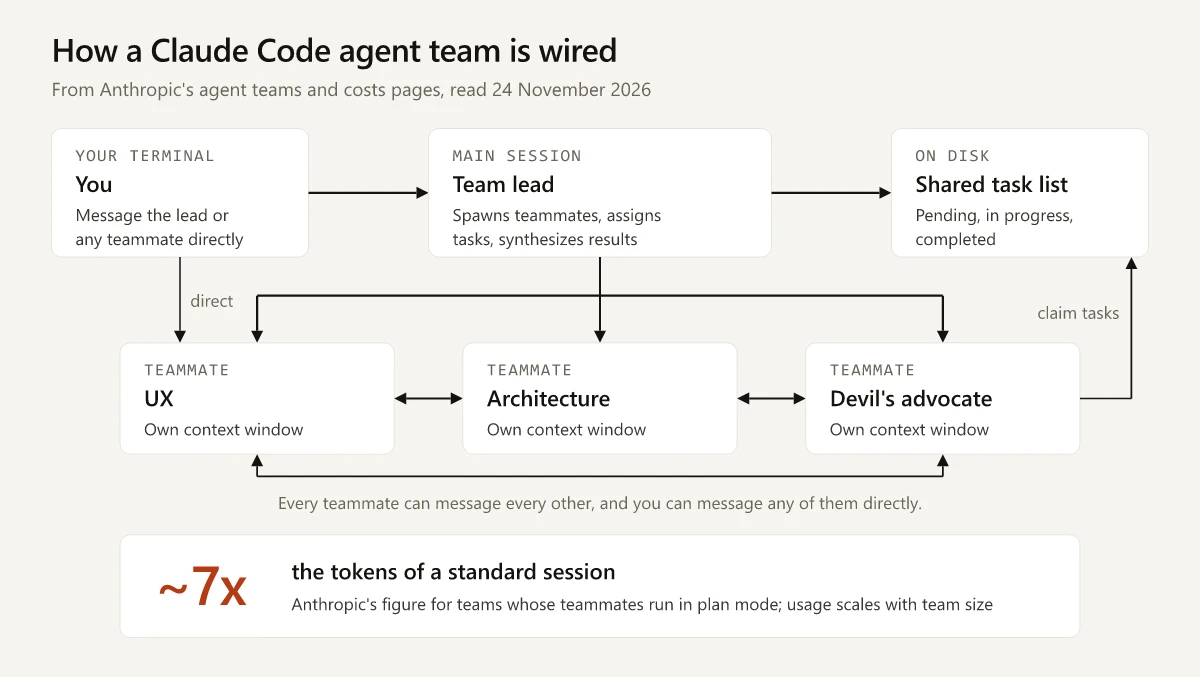
Claude Code agent teams are an experimental feature in which one Claude Code session, the team lead, spawns other Claude Code sessions called teammates, assigns them work and combines their results. Each teammate has its own context window, and teammates message each other directly. The feature stays off until you set one environment variable.
You can also message any teammate yourself without going through the lead. The changelog lists the feature under 2.1.32, dated 5 February 2026, as a “research preview agent teams feature for multi-agent collaboration” and labels it a “token-intensive feature”. The parts, from the architecture section of the agent teams page:
| Part | What the docs say it is | Where it lives |
|---|---|---|
| Team lead | ”The main Claude Code session that spawns teammates and coordinates work” | Your main session, for its whole lifetime |
| Teammates | ”Separate Claude Code instances that each work on assigned tasks” | Inside your main terminal, or in split panes |
| Task list | ”Shared list of work items that teammates claim and complete” | ~/.claude/tasks/{team-name}/, which stays on disk after the session ends |
| Mailbox | ”Messaging system for communication between agents” | ~/.claude/teams/{team-name}/inboxes/{agent-name}.json |
| Team config | Runtime state such as session IDs and tmux pane IDs | ~/.claude/teams/{team-name}/config.json, removed when the session ends |
The team name is session- followed by the first eight characters of the session ID. You cannot pre-write a team file for a project: the docs say a file like .claude/teams/teams.json in your project directory “is not recognized as configuration”.
The shared task list has a condition attached. It exists where the session has the Task tools, and the tools reference says those are “available by default only on Opus 4.7, Sonnet 4.6, Haiku 4.5, and earlier models”. On every other model Claude Code leaves them out unless you opt in, and the agent teams page says agents without them “coordinate through messages instead of the shared task list”.
How to Enable Claude Code Agent Teams
The steps below follow the enable section and the walkthrough for starting a team on the same page.
- Set the variable. Put
CLAUDE_CODE_EXPERIMENTAL_AGENT_TEAMSwith the value"1"underenvin a settings file, as in the block at the top of this page, or export it in your shell. - Start an interactive session. With the
-pflag, and in Agent SDK sessions, Claude does not spawn teammates even when the variable is set. - Ask for teammates in plain language. Describe the task and the roles you want; Claude spawns them and coordinates the work.
- Confirm a team formed. Claude may use subagents instead, and the docs warn that subagents “appear in the same agent panel as teammates, so the panel alone doesn’t confirm a team formed”. If that happens, ask again and explicitly request an agent team.
- Steer from the agent panel. The lead’s terminal lists teammates below the prompt input.
- Shut teammates down by name. For a teammate called researcher, the docs’ prompt is
Ask the researcher teammate to shut down. Claude Code cleans up the team’s shared directories when the session ends, apart from the task list folder in the table above.
The docs’ own first prompt uses three roles that can work without waiting on each other:
I'm designing a CLI tool that helps developers track TODO comments across
their codebase. Spawn three teammates to explore this from different angles:
one on UX, one on technical architecture, one playing devil's advocate.
In the default display mode, these keys drive the panel:
| Key | What it does |
|---|---|
| Up and Down arrows | Select a teammate |
| Enter | Open the selected teammate’s transcript and message it directly |
| Escape | Clear the selection; while you view a transcript, interrupt that teammate’s current turn |
x | Stop the selected teammate |
| Ctrl+T | Toggle the task list |
While you view a teammate, plain text and skills go to that teammate and built-in commands go to the lead’s session. /compact, /clear and /rewind act on the lead’s conversation, so Claude Code asks you to confirm them from that view, and /model and /fast do not run there at all.
The Side Effect: Named Subagents Launch as Teammates
The variable also changes sessions in which you never ask for a team. The docs put it in one line: “Enabling agent teams also changes ordinary delegation.” Claude can give a subagent a name on its own so that it can message it later, and “while agent teams are enabled, a subagent that Claude names launches as a teammate, so teams can form even when you didn’t ask for one”.
What that means in a session, per the agent teams page and the subagent names section:
- There is no confirmation step. “Claude Code doesn’t ask you to confirm the launch.”
- Two kinds of call are exempt: a fork, and a call that passes
isolationon the call itself. Anisolationvalue in the subagent’s own frontmatter does not prevent the launch. - A subagent that launched as a teammate runs in the main session’s working directory, and for messaging it after a restart the subagents page sends you to the agent team limitations.
If you set the variable once to try a team and left it on, this is the behavior to check for.
How to Turn Off Agent Teams
Set the same variable to 0:
{
  "env": {
    "CLAUDE_CODE_EXPERIMENTAL_AGENT_TEAMS": "0"
  }
}
The troubleshooting entry says you do not need a new session: “Claude Code reapplies settings-file env values to the running session when you save, and rereads the variable each time Claude spawns a subagent”. Other settings sources can still switch it back on:
| Where the variable is set | What happens |
|---|---|
0 in your user settings.json | Overrides a shell export |
1 in project settings, local settings or a --settings payload | Wins over the user file, since those apply after user settings |
| Managed settings from your organization | Apply after every other source; the docs say to ask your administrator to change the value |
After the change Claude may still name subagents. The name keeps working as an address for messages, and each named subagent runs as a subagent again.
Agent Teams Token Cost: Anthropic’s 7x Figure
The costs page gives one multiplier for teams and attaches a condition to it: approximately 7x the tokens of a standard session “when teammates run in plan mode”, with the explanation that “each teammate maintains its own context window and runs as a separate Claude instance”. I searched the costs page, the agent teams page and the parallel agents overview for a second token multiplier for teams and found none, so treat 7x as a figure for plan-mode teammates; for other teams the docs give only the direction: “Token costs scale linearly”, per the agent teams page, and the costs page says “Token usage scales with the number of active teammates and how long each one runs”.
The costs page also says “Each active teammate continues consuming tokens until it exits or the session ends”, so a teammate you forget to shut down keeps adding to your usage.
The habits in the cost guidance for teams:
- Use Sonnet for teammates; the page says it “balances capability and cost for coordination tasks”. My breakdown of what one job costs on Sonnet, Opus and Haiku has the per-model prices.
- Keep the team small.
- Keep spawn prompts focused. Teammates load CLAUDE.md, MCP servers and skills on their own, and “everything in the spawn prompt adds to their context from the start”.
- Shut teammates down when their work is done.
Caching works against a team that pauses. An in-process teammate’s cache, per the agent teams page, “holds for five minutes by default, including on a Claude subscription”, and the setting subagentPromptCacheTtl with the value 1h keeps it for an hour, with the caveat that the API “bills 1-hour cache writes at a higher rate”. What a cold cache does to a turn is covered in my triage for slow Claude Code responses.
Anthropic’s costs page lists active teammates among the reasons a session uses more of your plan limits (why usage climbs). If a team runs you into a limit, my guide to Claude usage limits and the ways back from one covers the reset, usage credits and what a limit message is telling you.
Claude Code Agent Teams vs Subagents
A subagent is a worker inside one session that does a side task in its own context and hands back a summary. My Claude Code commands reference covers the built-in subagent types, their limits and a custom subagent file, so this table starts where that section stops. Rows one to five are the docs’ own comparison; the last three come from other sections of the same docs.
| Subagents | Agent teams | |
|---|---|---|
| Context | ”Own context window; results return to the caller" | "Own context window; fully independent” |
| Communication | Return a result to the caller; subagents Claude named can also message each other | ”Teammates message each other directly” |
| Coordination | ”Main agent manages all work” | Self-coordination through messages, plus a shared task list for agents that have the Task tools |
| Best for | ”Focused tasks where only the result matters" | "Complex work requiring discussion and collaboration” |
| Token cost | ”Lower: results summarized back to main context" | "Higher: each teammate is a separate Claude instance” |
Non-interactive runs (-p, Agent SDK) | Run as ordinary subagents | Claude does not spawn teammates |
| Separate git worktrees | Each subagent can get one | ”Agent teams don’t isolate teammates in worktrees” |
| Status label in the docs | None | Experimental, disabled by default |
The docs’ rule of thumb: “Use subagents when you need quick, focused workers that report back. Use agent teams when teammates need to share findings, challenge each other, and coordinate on their own.”
The two also overlap. You can name an existing subagent definition when you ask for a teammate, and Claude Code applies parts of it:
toolslimits the teammate to the tools on that list.modelis used when your spawn prompt does not name a model.- The body is appended to an in-process teammate’s default system prompt, and replaces the default system prompt of a split-pane teammate.
skillsis not applied in either display mode; the teammate loads skills from your project and user settings.mcpServersapplies to a split-pane teammate and is ignored by an in-process one.
Teammate Model Order
Per the models section, Claude Code checks these sources in order and uses the earliest one that applies:
- The model your spawn prompt names for that teammate, as in “Use Sonnet for each teammate.”
- The
modelfield of the subagent definition the teammate was spawned from, whereinheritselects the lead’s model. - The
CLAUDE_CODE_SUBAGENT_MODELvariable, when it is set to anything other thaninherit. - The lead’s current model.
Setting CLAUDE_CODE_SUBAGENT_MODEL_FORCE=1 removes sources 1 and 2. A teammate’s model and fast mode are fixed when it spawns, so the choice has to be made in the spawn prompt or before it.
Agent Teams Display Modes: In-Process, tmux and iTerm2
Agent teams have two display modes. The setting that picks between them is teammateMode, and its values come from the settings reference:
teammateMode value | What you get | What it needs |
|---|---|---|
"in-process" (the default) | Teammates run inside your main terminal pane | Nothing extra; the docs say it “Works in any terminal” |
"auto" | Split panes when you run inside tmux, or inside iTerm2 with it2 on your PATH or tmux installed; in-process otherwise | tmux, or iTerm2 |
"tmux" | Split panes using tmux or iTerm2, detected from your terminal | tmux installed; outside tmux the panes open in a separate tmux session |
"iterm2" | iTerm2 native split panes | The it2 CLI and iTerm2’s Python API enabled |
For one session, claude --teammate-mode auto does the same job. The docs note that the flag “is experimental and doesn’t appear in claude --help”.
In split panes you click into a teammate’s pane to talk to it.
Agent Teams on Windows and in VS Code
Split panes need tmux or iTerm2. The agent teams page says tmux “has known limitations on certain operating systems and traditionally works best on macOS”, the tmux README lists the systems a release runs on as “OpenBSD, FreeBSD, NetBSD, Linux, macOS and Solaris”, and the iTerm2 home page says it works on Macs. Neither of those two pages mentions Windows.
That leaves a Windows reader with these facts:
- In-process mode is the default and the docs say it works in any terminal, so a team does not depend on tmux.
- tmux’s README lists Linux but not Windows. On a Windows machine, the Linux route Anthropic documents for Claude Code is WSL (its setup page lists WSL 2 and WSL 1), where Claude Code is a separate install with separate settings; where to run Claude Code on a Windows machine covers that choice. Anthropic’s agent teams page does not say whether split panes work in WSL.
- The text of Anthropic’s VS Code page did not contain the words “agent team” or “teammate” when I searched its Markdown source on 24 November 2026. The agent teams page places the agent panel in the lead’s terminal, below the prompt input, and does not mention the extension’s chat panel.
I work in the VS Code extension on Windows 11, with Git Bash and PowerShell as shells. What Anthropic’s agent teams page does cover is a terminal session, and VS Code’s integrated terminal is one; the gaps between the extension and the CLI show what else changes when you move from the chat panel to claude in that terminal.
Agent Teams Settings and Version Ledger
This table lists the settings, flags and variables in the docs that most directly change how agent teams behave, with the version or date Anthropic attaches to it. The dates come from the changelog.
| Item | What it does | Version or date in the docs |
|---|---|---|
CLAUDE_CODE_EXPERIMENTAL_AGENT_TEAMS=1 | Turns agent teams on | Added in 2.1.32, 5 February 2026 |
The same variable set to 0 | Turns them off; applies to the running session when you save | No version stated |
teammateMode | Picks in-process or split panes | Default "in-process" |
--teammate-mode | The same choice for one session | Experimental; not in claude --help |
teammateDefaultModel | Removed; Claude Code ignores a leftover value | Removed in v2.1.234, 17 August 2026 |
CLAUDE_CODE_SUBAGENT_MODEL | Third in the teammate model order | Before v2.1.251 (28 August 2026) it came ahead of the other sources |
CLAUDE_CODE_SUBAGENT_MODEL_FORCE=1 | Puts every teammate on one model | Requires v2.1.257 or later (1 September 2026) |
subagentPromptCacheTtl: "1h" | Keeps an in-process teammate’s cache for an hour instead of five minutes | The key requires v2.1.242 or later |
cleanupPeriodDays | Sets how long ~/.claude/tasks/{team-name}/ stays on disk | Default 30 days |
| Lead’s effort level on split-pane teammates | A teammate on the lead’s model inherits the lead’s effort | From v2.1.186 (22 June 2026) |
--setting-sources | Teammates load from the same restricted list of sources | Split-pane teammates from v2.1.281 (23 September 2026) |
autoCompactWindow in a subagent definition | Applied to an in-process teammate; ignored by a split-pane one | Requires v2.1.296 or later (9 October 2026) |
--disallowedTools and --tools | A split-pane teammate starts with the lead’s deny rules and tool list | Requires v2.1.309 or later (22 October 2026) |
Split-pane teammate of a lead in Manual or dontAsk mode | Starts in Manual mode | Requires v2.1.317 or later (3 November 2026) |
The feature is still moving. I counted the 20 newest releases listed on the changelog on 24 November 2026, from 2.1.308 of 22 October to 2.1.331 of 23 November: 11 of the 20 carry at least one line about teammates or agent teams. Two examples from 19 November: 2.1.329 “Fixed the Agent tool’s effort parameter being ignored for named teammates in agent teams”, and 2.1.328 improved starting several in-process teammates at once. Run claude --version before you trust a row above.
Agent Teams Limitations as of November 2026
This table follows the limitations list on the agent teams page and adds one row from the parallel agents overview:
| Limitation | What the docs say | What to do |
|---|---|---|
| No session resumption with in-process teammates | ”/resume and /rewind do not restore in-process teammates”; the lead may message teammates that no longer exist | Tell the lead to spawn new teammates |
| Task status can lag | Teammates “sometimes fail to mark tasks as completed, which blocks dependent tasks” | Check the work, then update the status yourself or have the lead nudge the teammate |
| Shutdown can be slow | A teammate finishes its current request or tool call before it shuts down | Wait for it |
| One team per session | ”You can’t create additional named teams or share a team across sessions.” | Start a second session for a second team |
| No nested teams | Teammates “cannot spawn their own teammates” | Route requests through the lead |
| No background subagents from in-process teammates | A teammate’s own subagents run in the foreground | Plan for the teammate to wait on them |
| The lead is fixed | ”You can’t promote a teammate to lead or transfer leadership.” | Pick the lead session before you start |
| No per-teammate permission modes at spawn | A teammate starts with the lead’s mode | Cycle a running teammate’s mode with Shift+Tab; an in-process teammate can still run in the lead’s mode |
| Split panes require tmux or iTerm2 | The default in-process mode works in any terminal | See the display modes section above |
| No worktree isolation | ”Agent teams don’t isolate teammates in worktrees” | Give each teammate its own set of files |
On the top row, /rewind has gaps outside teams too, and what Claude Code rewind can and cannot undo lists them.
Permissions Follow the Lead
A new teammate starts with the lead’s permission mode, “including bypassPermissions mode”. Teammate permission prompts appear in the lead session, and a teammate “can’t approve a permission prompt or supply consent on your behalf”. Plans are the exception to your sign-off: when a teammate spawned in plan mode finishes planning, “Claude Code approves the plan as soon as the request arrives, without the lead reviewing it”, unless you changed that teammate’s mode after it spawned. The docs suggest pre-approving common operations before you spawn, and the modes and rule order behind Claude Code permission prompts shows where those rules go.
Context Does Not Carry Over
A teammate loads the same project context as a regular session (CLAUDE.md, MCP servers and skills) plus the lead’s spawn prompt, and the lead’s “conversation history does not carry over”. Anything the lead learned in conversation has to be written into the spawn prompt or into a file; how Claude Code memory works covers what belongs in CLAUDE.md.
Agent Teams vs Agent View, Dynamic Workflows and Projects
Anthropic’s parallel agents overview counts five ways to work on several tasks at once. This table merges that page with the “who holds the plan” table on the dynamic workflows page, as both read on 24 November 2026:
| Approach | Who coordinates | Where results go | Status in the docs | The docs’ “use it when” |
|---|---|---|---|---|
| Subagents | Claude, inside one conversation | Back to the conversation that spawned them | No label | A side task would flood your main conversation with output you will not reference again |
Agent view (claude agents) | You hand off tasks and check back later | To you: “agent view sessions report results only to you” | Research preview | You have several independent tasks and want to step in only when one needs you |
| Agent teams | A lead session plans, assigns and supervises | Direct messages between teammates and a shared task list | Experimental, disabled by default | ”You want Claude to split a project into pieces, assign them, and keep the workers in sync” |
| Dynamic workflows | A script holds the plan | Script variables; Claude’s context holds the final answer | On all paid plans; on Pro, switched on in /config | A job outgrows a handful of subagents, such as a 500-file migration |
| Projects | Claude, in one ongoing conversation at claude.ai/code or in the desktop app | The project conversation, which shows you which threads need you (threads run in the cloud or on your computer through Remote Control) | Public beta on Pro, Max and Ultra | The work spans many tasks over days or weeks and should keep running when your machine is off |
The scale row on the workflows page separates the middle of that table: subagents handle “A few delegated tasks per turn”, agent teams “A handful of long-running peers”, and workflows “Dozens to hundreds of agents per run”.
Two of these have their own posts here. Agent view’s alerts are in my guide to Claude Code’s notification signals, and the redesigned projects and their threads are in Claude Projects vs Skills.
Agent Teams Best Practices: Team Size, Tasks and Prompts
The best practices section is specific about numbers:
| Question | The docs’ answer |
|---|---|
| How many teammates? | ”Start with 3-5 teammates for most workflows.” There is “no hard limit on the number of teammates” |
| How many for 15 independent tasks? | “3 teammates is a good starting point” |
| How many tasks each? | ”Having 5-6 tasks per teammate keeps everyone productive and lets the lead reassign work if someone gets stuck.” |
| Can two teammates share a file? | ”Two teammates editing the same file leads to overwrites.” |
| What should a first team do? | Work with clear boundaries that does not require writing code, such as researching a library or investigating a bug |
Two prompt habits from the same page:
- Name the teammates in your spawn instruction if you want predictable names to refer to later.
- If the lead starts doing the work itself, the docs’ line is
Wait for your teammates to complete their tasks before proceeding.
The docs’ debugging example is a task that needs workers who talk, since each teammate is told to try to disprove the others:
Users report the app exits after one message instead of staying connected.
Spawn 5 agent teammates to investigate different hypotheses. Have them talk to
each other to try to disprove each other's theories, like a scientific
debate. Update the findings doc with whatever consensus emerges.
The same shape fits a marketing site. This prompt is illustrative, written for this post to mirror the docs’ three-role example:
I'm planning a landing page for a free ROI calculator. Spawn three teammates
to explore it from different angles: one on the copy and offer, one on page
structure and load speed, one playing devil's advocate. Use Sonnet for each
teammate, and have them challenge each other's findings before you summarize.
Reach for Agent Teams Last
In Anthropic’s docs, Claude Code agent teams come with an experimental label and a token multiplier, and neither is attached to a single session or to subagents. The setting that enables them also changes how ordinary subagents launch. Those are reasons to leave the variable off and switch it on per task.
The decision rule I take from the docs:
- Sequential work, same-file edits or many dependencies: one session, or subagents.
- Workers that need to report back and nothing more: subagents.
- Independent tasks you can walk away from: agent view.
- Separate sessions you started that only need to pass findings: cross-session messaging.
- Workers that have to share findings and challenge each other: an agent team of three to five, on Sonnet, each with its own files.
- Dozens of agents: a dynamic workflow.
When a task does land on the agent team line, set the variable to 1, run the team, check /usage, and set it back to 0 in the same settings file.
Frequently Asked Questions
How do I enable agent teams in Claude Code?
Set the environment variable CLAUDE_CODE_EXPERIMENTAL_AGENT_TEAMS to 1, in your shell or under env in settings.json, then ask Claude for teammates in an interactive session. As of November 2026, Anthropic's docs call the feature experimental and disabled by default.
Agent teams vs subagents in Claude Code: what is the difference?
A subagent works inside one session and returns its result to the agent that called it. Teammates in an agent team are separate Claude Code sessions that message each other directly, coordinated by a lead session. Anthropic's comparison table rates the token cost of subagents as lower and of agent teams as higher.
How many tokens do Claude Code agent teams use?
Anthropic's costs page says agent teams use approximately 7x more tokens than standard sessions when teammates run in plan mode. Usage scales with the number of active teammates and how long each one runs, and each teammate keeps consuming tokens until it exits or the session ends.
Do agent teams need tmux?
No. The default in-process mode runs every teammate inside your main terminal and, per Anthropic's docs, works in any terminal. Split panes, where each teammate gets its own pane, require tmux or iTerm2 with the it2 CLI, plus the teammateMode setting or the --teammate-mode flag.
How do I turn off agent teams in Claude Code?
Set CLAUDE_CODE_EXPERIMENTAL_AGENT_TEAMS to 0 under env in settings.json. Anthropic's docs say you do not need a new session, since Claude Code reapplies settings-file env values to the running session when you save. A project, local or managed settings file can still set the variable back to 1.